Showing posts with label DNA. Show all posts

Tuesday, January 19, 2016

Just How are Related to Each Other Again?

Just how exactly is your second cousin once removed related to you, and what does that mean for the amount of DNA you share?

One of the most confusing things about genealogy is when you get into those second cousin once removed situations. Nobody know how that works.

I have seen a number of nice charts, and I've added my own. This one includes a blue shading for just how much DNA you share with the person.  I think this really helps show just how much you are related to everyone.

Genealogical Relationship Tree with shared DNA cM


I'd like to thank all the others who have done so much more work on both relationship mapping and genetics. Alice J. Ramsay created one of the first relationship charts back in 1987. And if you really want to fully understand DNA and cM sharing, you'll want to read more from Blaine T. Gettinger, The Genetic Genealogist.  


Monday, November 2, 2015

How to Color Code Your Family Surnames Research

When people first start doing genealogy and being to research their family surnames, most of them are smart enough to realize they must divide and conquer.  They start with two files: one for their mother's family and one for the their father's side.  So very organized, how wonderful!

Warning. This is not enough dividing!  At the minimum you need four files, one for each set of great grandparents.  In fact, this is what FamilySearch has also decided is the least you should do.

FamilySearch has a really nice fan chart that is automatically created for you, once you've fine-tuned your tree on their site.  This fan chart includes color coding for four families, and your best bet is to use it.
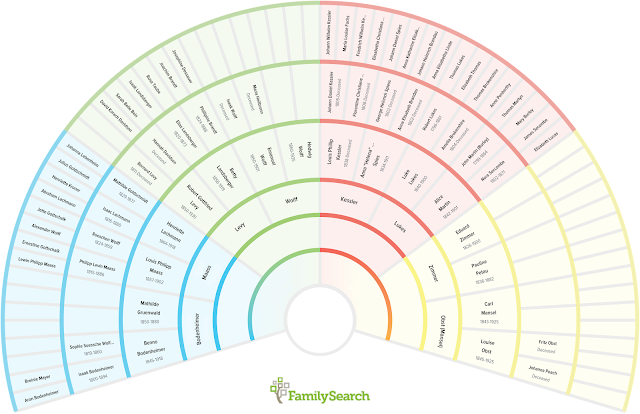
FamilySearch Color Coded Fan Chart
As you progress, you'll realize that what you really wanted along was eight files, one for each set of great great grandparents!  These are the eight families that I'm tracking.

What I like about having eight folders is that it really separates out the lines nicely so that you can fully concentrate on just one part of the tree.

There are more personal reasons to divide them into eight.

My grandmother's cousins don't care that much about her husband's family, so that means at least four groups. I mean they care about me and my cousins and uncles and all that, but they really don't care that I've traced my grandfather's mother's line way way back to wherever -- they simply don't share any DNA with them. I've set up mailing lists, Facebook groups, and family reunions and it's always a challenge to make sure they right people are invited -- ones that will care about each other, or something simple like that.

With eight groups, you really dial in on the family that wants to know more about that line.  Once you get back to great great grandparents, there is usually enough long lost third cousins, second cousins, and cousins that you should have enough people to talk to without annoying anyone. If you look at the red area in the photo above, you see the Kessler and Lukes families together. Well, if it wasn't for a single marriage that I care an awful lot about, those two families would never ever know about each other.  Having them in a single group means that I am always sending out stuff that doesn't matter to half the people.

Concentrating on eight also really helps with DNA research.  If you only test yourself, you will be completely overwhelmed with hundreds of matches that you can't figure out.  You need to find some third cousins, or your parent's second cousins, so you can get eight tests done to make the most of your DNA matches.  Again, dividing into eight lets you find one potential test in an organized manner, color coded for your listening pleasure.

Divide and conquer, and follow the FamilySearch color scheme. Why not?


Tuesday, September 8, 2015

How to get the most out of AncestryDNA

We all know that Ancestry.com is an immensely popular website for family genealogical research. They were one of the early adopters of using DNA to help in finding your deepest hidden roots, and their AncestryDNA offering is well integrated into the rest of their tools. As more and more people add their family trees and DNA, it really becomes exciting to see how the power of our collected wisdom and spit can bring widely fractured families back together.

It can be very heartwarming to firmly and finally know that you are not alone. You have blood relatives you didn't even know about!

But, let's first start with talking about how not to use AncestryDNA.  I don't know why we have to go over this, but we do. People do these things all the time, and it makes no sense. 

Top Five Wrong Ways to use AncestryDNA 


1) Don't Build a Tree - I can't tell you how many times I have gotten a DNA match and found no tree associated with that person. That's a complete dead end, a waste of my time, and a waste of their money (did I mention that DNA tests are $99 each, and don't get me wrong: this is amazingly cheap, but it's still a lot of money to waste). I've tried to figure out why this happens, and the only thing I can think of is that they took the test, got some results they didn't like (related to me or something horrible like that), and then tried to delete everything. There is a "Delete This Test" button just for that case. Use it. It would be better than running into a test with no tree.

For those of you using who are using AncestryDNA to find your birth parents after a closed adoption, you still need to build a tree so that you can make full use of the tools. Put in guesses, unknown, generic terms like "paternal grandfather". Most of us want to help you, we really do! Please name your tree something like "Adopted, Searching for Birth Parents" that will give us some context. 

2) Have a Private Tree - Why why why why why! I have heard all the pros and cons about private trees -- trust me, I have.  They are all nicely thought out and mostly wrong (but that's another post). However, in the case of DNA that are absolutely wrong. Ridiculously wrong. Using DNA tools requires us all to cooperate and compare our DNA. Give and take. It's just plain wrong to use the tools while hiding in the background and not sharing your tree. That would be all take and no give. Having a private tree is in some ways worse than no tree at all: you get to see all the hints, leaving everyone else locked out. Nice.

Again, just in case you are adopted and think that searching in secret is best: don't make it more difficult for me to help you! Make it simple and welcoming. Not locked.

Just a quick side note, this example is really a classic. It is a real match in my own tree.
Take a close look at it. I mean, at least they have a tree -- a big wonderful tree. Private and locked out.  But the worst is that there is a tantalizing green leaf -- one of only six that I've ever seen. That means there is a hint. That Ancestry actually knows how we are related. When I click on "View Match", my only option is to message the owner. I've done this and been ignored. He or she knows how we are related, as my tree is public, and that's good enough for them. 

3) Ignore Messages - However, if you really do need to have a private tree because your life is in danger (like I said, I've heard them all), you absolutely need to respond to private messages and give access to those you deem trustworthy enough not to kill you. I still don't know why you'd have your DNA on a public site if you are in witness protection, but that's just me thinking out loud again.  

4) Test Only Yourself - Yes, this is where everyone starts. Do the test yourself. You you you.  However, guess what you get. You get results back on everyone who matches you. Great. Now which branch of the family tree do you need to research. Argh! The whole tree! Yikes!   Testing other people, even just your parents, allows you to divide and conquer. Finding someone who matches your father lets you ignore half the tree -- and, oh by the way, they also match you (obviously).  Testing second cousins is great too, as any matches that you share with them narrow your search way up the tree to your great grandparents lines (that's only an eighth of the tree instead of the entire tree). Ancestry just released a bunch of new tools for finding common matches between multiple tests you've administered. 

5) Give Up and Never Come Back - Here's what happens. You get excited and buy an AncestryDNA kit and test yourself. You find a few hundred distant cousins with no trees, and you have no way to figure out the connection. Even if they do respond, which they often don't, you trade a few e-mails and give up. You don't go back, and you don't answer any Ancestry messages. You are one of the ghosts. Zombies. However, here's the problem. The DNA database is growing every day. In June, AncestryDNA celebrated passing the one million people mark. You need to come back and check again. Their are a lot more matches and messages waiting for you! Come back! There are a million of us waiting for you!


So therefore, a quick refresher on the right way to use AncestryDNA correctly.

Top Five Ways to get the most out of AncestryDNA 

  1. Build a Tree - Build a tree that includes all your blood DNA relatives, including uncles, aunts, cousins, and all. Not just grandparents. 
  2. Have a Public Tree - Make your tree public for goodness sake. 
  3. Visit Message Center - Check your messages and respond to them. Follow up! These might be long lost 6th cousin that you'll want to stay with in New Zealand. 
  4. Buy More Tests - Test your parents, and then start testing your parents cousins. Second cousins are the best! Divide and conquer! Use the new tools that AncestryDNA are creating to handle multiple tests. 
  5. Come Back - More and more people are uploading DNA every single day. Come back and check again. Just because you didn't find something the first time, doesn't mean that the world stopped turning. 


Suggestions for AncestryDNA 


Since I am a very Product Management professional, I can't end there. I have to put in my two cents for any Ancestry.com employees that happen to read this. Please pass these along to your Product Management team.
My AncestryDNA Pet Peeve
  • Private Trees - Let me make my tree private only to those people with private trees. Just desserts. I'm sort of kidding with this one, but it really is a pet peeve.  Perhaps another alternative is for them to have a setting for "allow DNA matches to view my tree, keeping it Private for everyone else."  And, at the same time, make it a one-button step to "allow access" and "ask for access" -- I think in many cases people with Private trees just don't know how to share them. 
  • Triangulation - Yes, AncestryDNA just released a new feature that allows you to filter by other tests. This is fantastic, and allows for "phasing" or triangulation.  I think more of these tools are necessary.  Sorting through all the results is very difficult. We need more divide and conquer methods. Make it easier for me to buy more tests and use them to narrow my searches. 
  • Test Suggestions - Give me suggestions on who to get tested.  Who will give me the best bang  for my buck.  Yes, I obviously work in Product Management. Get more money from me by giving me good tools and reasons to buy more tests!  
  • Tagging or Placing - Once I've finally figured out how someone is related to me, I should be able to note that in big bold letters in some manner. Let me place them in my tree, and show the DNA verified relationship as a special checkmark or something.  Then, let me filter by them as well in my normal DNA searches. I can filter by "Father" as my Dad has taken a test, but I can't filter by "Aunt K." or any other known matches. Yes, you can view shared matches once you click through to a person, but I want to be able to create my own filters and apply multiple to my Search (I have 149 pages of DNA results; 50 per page). 

Links